Gaming, Computer Tech & Electronics Fortnite.CounterStrike.CallOfDuty.Dota.MineCraft.
Tips & tricks, tech support, home theatre, online gaming, reviews, latest news... |
 |
 10-28-2012, 05:57 PM
|
#1
|
|
Head Moderator
Join Date: Dec 1982
Location: Great White Nor
Posts: 22,660
Thanked 6,462 Times in 2,081 Posts
Failed 98 Times in 51 Posts
|
Adobe After Effects Help
Long shot, but just in case someone here knows wtf I'm talking about, I'd appreciate the help.
I've got a 3d room set up and I'm trying to create a solid to run in 3d space via a null object, while keeping said solid in 2d. In my effects cotrol bar for the solid, I can adjust for the z-axis, but when I go into my comp layers, it only shows x and y.
Thoughts?
|

|

|
|
10-29-2012, 02:15 AM
|
#2
|
|
Need to Shave n Shower, but I CANT STOP POSTING ON RS
Join Date: Apr 2004
Location: Nanaimo
Posts: 17,665
Thanked 8,543 Times in 4,001 Posts
Failed 1,523 Times in 659 Posts
|
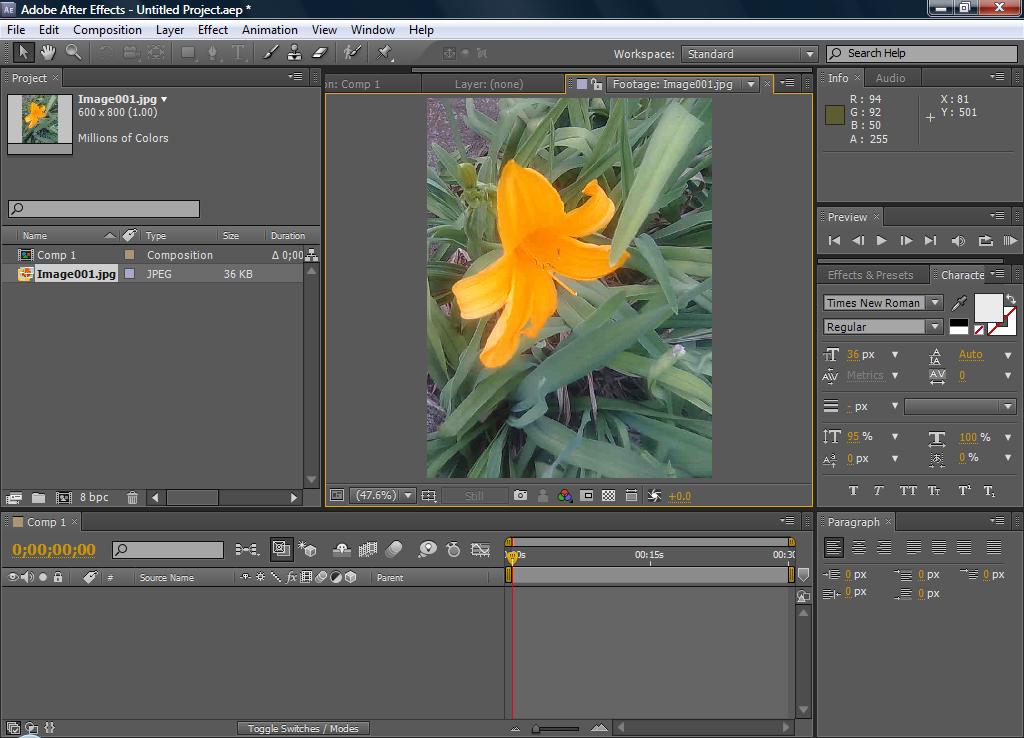
I have not used it in a long time but have you hit the 3D switch. Its pic of the box to left of the word parent in this picture.
__________________
Until the lions have their own historians, the history of the hunt will always glorify the hunter.
|
|
|
|
|
10-29-2012, 08:31 AM
|
#3
|
|
Head Moderator
Join Date: Dec 1982
Location: Great White Nor
Posts: 22,660
Thanked 6,462 Times in 2,081 Posts
Failed 98 Times in 51 Posts
|
Yeah, I had the 3D switch on. I could access the z-axis in the effects control bar, but not in the comp timeline. Eitherway, I figured out a way to pick whip from the effect bar into the null object on the timeline, allowing me access to the expressions to adjust for z.
Thanks though. 
|
|
|
|
|
 Posting Rules
|
You may not post new threads
You may not post replies
You may not post attachments
You may not edit your posts
HTML code is Off
|
|
|
All times are GMT -8. The time now is 02:47 AM.
|
 You are currently viewing our boards as a guest which gives you limited access to view most discussions and access our other features. By joining our free community you will have access to post topics, communicate privately with other members (PM), respond to polls, upload content and access many other special features. Registration is fast, simple and absolutely free so please, join our community today!
The banners on the left side and below do not show for registered users!
You are currently viewing our boards as a guest which gives you limited access to view most discussions and access our other features. By joining our free community you will have access to post topics, communicate privately with other members (PM), respond to polls, upload content and access many other special features. Registration is fast, simple and absolutely free so please, join our community today!
The banners on the left side and below do not show for registered users!