Gaming, Computer Tech & Electronics Fortnite.CounterStrike.CallOfDuty.Dota.MineCraft.
Tips & tricks, tech support, home theatre, online gaming, reviews, latest news... |
 |
 03-25-2015, 01:17 AM
|
#1
|
|
Banned (ABWS)?
Join Date: Oct 2004
Location: Vancouver
Posts: 19,493
Thanked 4,139 Times in 1,786 Posts
Failed 434 Times in 211 Posts
|
Need to connect VGA monitor to DVI-D or HDMI video card
I need to connect my VGA monitor into my video card. But the only port available is a DVI-D or HDMI. (The DVI-I port is already being used).
What's the best way to make this connection?
From what I am aware, there is no direct (passive) cable connection that can transfer VGA's analog signal?
I'm not sure if an active adapter is what I need. There's many versions of these, and when I try to research about them, it seems like they are mainly used for hooking up a TV to your PC.
I'm using a 1680x1050 res monitor, so I want to be sure whatever adapter can support up to that resolution as well...
Last edited by AzNightmare; 03-25-2015 at 01:24 AM.
|

|

|
|
03-25-2015, 08:23 AM
|
#2
|
|
My dinner reheated before my turbo spooled
Join Date: Dec 2003
Location: Peace River, AB
Posts: 1,778
Thanked 158 Times in 103 Posts
Failed 41 Times in 14 Posts
|
Why not switch the DVI-I connection cable to the DVI-D port (unless you're using the analog portion of the DVI-I)? Then use the DVI-I adapter to VGA. These adapters are so common.
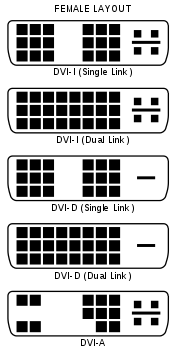
DVI-I port will accept both analog and digital signals. DVI-D will only accept digital signal, although you can use a converter, but the signal quality will decrease.
__________________
Quote:
Unknown
"If someone has to pass you on the right, you are in the wrong lane."
|
|
|
|
|
|
03-25-2015, 08:26 AM
|
#3
|
|
My dinner reheated before my turbo spooled
Join Date: Dec 2003
Location: Peace River, AB
Posts: 1,778
Thanked 158 Times in 103 Posts
Failed 41 Times in 14 Posts
|
DVI-D to VGA Active Adapter Converter Cable – 1920x1200
Active DVI-D to VGA Adapter | StarTech.com Canada
__________________
Quote:
Unknown
"If someone has to pass you on the right, you are in the wrong lane."
|
|
|
|
|
|
03-25-2015, 08:32 AM
|
#4
|
|
I WANT MY 10 YEARS BACK FROM RS.net!
Join Date: Oct 2007
Location: Vancouver BC
Posts: 22,232
Thanked 10,011 Times in 3,975 Posts
Failed 882 Times in 422 Posts
|
i had the opposite problem and wanted to connect analog iGPU to my TV...active adapters are expensive so I ended up buying a new card.
you're better off finding on craigslist a dirt cheap/free video card that has a VGA port
|
|
|
|
|
03-25-2015, 11:19 AM
|
#5
|
|
Banned (ABWS)?
Join Date: Oct 2004
Location: Vancouver
Posts: 19,493
Thanked 4,139 Times in 1,786 Posts
Failed 434 Times in 211 Posts
|
My situation is kind of fucked up, but I simplified it in my OP.
I'm basically using a triple monitor setup mounted on a a DIY custom frame. Being "OCD", I can't stand it if my monitors weren't all the same model.
Over time, 2 of my monitor's EDID got messed, so they cannot be connected via DVI anymore. VGA is okay, but it won't connect digitally anymore. When the first monitor went down, I did a lot of research/Googling, and spent about 2 weeks trying to fix it with no luck. So this time around, I know better not to waste my time and just find an adapter to connect it with VGA.
My video card has DVI-I, DVI-D, HDMI outputs.
My good monitor is connected via DVI-D.
My 1st shitty monitor is connected with the VGA adapter to the DVI-I port.
Now my 2nd shitty monitor needs an adapter to connect to the HDMI with a VGA cable.
These monitors are almost 8 years old... 21", 16:10 ratio. I still like them, and while it would be easier to just get new monitors, I don't have the money to fork out for 3 (same model) monitors at once. Plus, it would mean I would have to make a new frame again...
Pretty frustrating. Spent 3 hours last night plugging and unplugging, switching cables around, resetting my monitor, couldn't get it to work digitally anymore.
/rant.
Quote:
Originally Posted by Reeyal

|
Thanks, I'll look for something like that.
Last edited by AzNightmare; 03-25-2015 at 11:29 AM.
|
|
|
|
|
03-25-2015, 12:15 PM
|
#6
|
|
I WANT MY 10 YEARS BACK FROM RS.net!
Join Date: Oct 2007
Location: Vancouver BC
Posts: 22,232
Thanked 10,011 Times in 3,975 Posts
Failed 882 Times in 422 Posts
|
if 2 already died chances are your 3rd one will malfunction soon
these days it'll cost less to buy 3 of the same monitiors on sale than it did for one of those monitors back then
trying to solve a problem with near decade old monitors will just give you more headache in the end as you've already figured that out...don't bother spending money and more importantly time trying to get analog signals to work in 2015 IMO
|
|
|
|
|
03-25-2015, 01:02 PM
|
#7
|
|
Banned (ABWS)?
Join Date: Oct 2004
Location: Vancouver
Posts: 19,493
Thanked 4,139 Times in 1,786 Posts
Failed 434 Times in 211 Posts
|
Quote:
Originally Posted by twitchyzero
if 2 already died chances are your 3rd one will malfunction soon
these days it'll cost less to buy 3 of the same monitiors on sale than it did for one of those monitors back then
trying to solve a problem with near decade old monitors will just give you more headache in the end as you've already figured that out...don't bother spending money and more importantly time trying to get analog signals to work in 2015 IMO
|
It's a better and more logical solution, and if I had the cash, I would go this route. But buying 3 new monitors at once will probably still put me at around $500-600~ after taxes.
I don't really game much, so VGA is still sufficient. I personally haven't noticed any difference tbh, and I can actually compare my digital vs analog monitors side by side.
Maybe in a year, I can do an overhaul. Just not a good time right now...
Last edited by AzNightmare; 03-25-2015 at 01:21 PM.
|
|
|
|
|
03-25-2015, 02:27 PM
|
#8
|
|
My dinner reheated before my turbo spooled
Join Date: Dec 2003
Location: Peace River, AB
Posts: 1,778
Thanked 158 Times in 103 Posts
Failed 41 Times in 14 Posts
|
Oh, OK.
You'll need this:
HDMI® to VGA Adapter Converter for Desktop PC / Laptop / Ultrabook - 1920x1080
HDMI to VGA Adapter | StarTech.com Canada
__________________
Quote:
Unknown
"If someone has to pass you on the right, you are in the wrong lane."
|
|
|
|
|
|
 Posting Rules
|
You may not post new threads
You may not post replies
You may not post attachments
You may not edit your posts
HTML code is Off
|
|
|
All times are GMT -8. The time now is 03:48 PM.
|
 You are currently viewing our boards as a guest which gives you limited access to view most discussions and access our other features. By joining our free community you will have access to post topics, communicate privately with other members (PM), respond to polls, upload content and access many other special features. Registration is fast, simple and absolutely free so please, join our community today!
The banners on the left side and below do not show for registered users!
You are currently viewing our boards as a guest which gives you limited access to view most discussions and access our other features. By joining our free community you will have access to post topics, communicate privately with other members (PM), respond to polls, upload content and access many other special features. Registration is fast, simple and absolutely free so please, join our community today!
The banners on the left side and below do not show for registered users!