| Vancouver Auto Chat 2016 VAC Community Head Moderator: Raid3n |
 |
 04-26-2018, 08:09 PM
|
#1
|
|
RS.net, helping ugly ppl have sex since 2001
Join Date: Feb 2011
Location: Richmond
Posts: 8,469
Thanked 14,968 Times in 3,904 Posts
Failed 471 Times in 216 Posts
|
Help needed: simple MS Paint / Photoshop
tl;dr - please someone with photoshop skills take the photo of the word "motorsport" and curve it so i can print it out on a decal and put it on my wheels.
hey RS. long story short i grew up with PC's but my better half is a firm Mac person. anyways, i have a project which involves printing out a bunch of stickers. i am putting decals on my wheels which is easy enough, but one of the words has to be curved to match the wheel. i have no idea how to use this mac (or anything computer related) and can't seem to find an application that i can actually stretch or skew the image to give the effect of the word bending.
i know just reading that it makes no sense. heres what i plan to do.

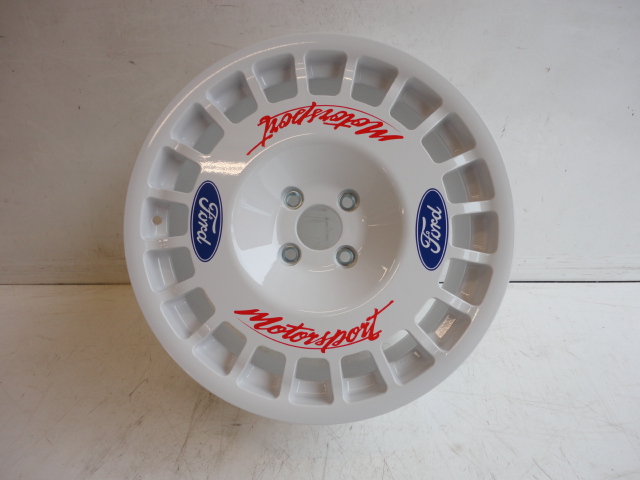
so what i will need to do is print out 2 ford logo's per wheel (super easy) but then i will need to also print out 2 'motorsport' per wheel, but they need to be curved to match the contour of the wheel. i will attach 3 clips so you know what i mean
 ford motorsport ford motorsport by 320iCar, on Flickr
 motorsport motorsport by 320iCar, on Flickr
 ford ford by 320iCar, on Flickr
i had these wheels plastidipped in white on my old focus ST, and would love to run these wheels again. but since my RS is white, i can't put them on unless the decals are on there to bring in some colour. heres the dimensions of the wheel.
OD: 14", ID: 8"
thinking of making the ford logo about 4" long, and the motorsport about 8" long, maybe 10" since it will curve.
 Untitled Untitled by 320iCar, on Flickr
 Untitled Untitled by 320iCar, on Flickr
 Untitled Untitled by 320iCar, on Flickr
 Untitled Untitled by 320iCar, on Flickr
 Untitled Untitled by 320iCar, on Flickr
 Untitled Untitled by 320iCar, on Flickr
thank you to anyone who can help!!!!!
|

|

|
|
04-26-2018, 08:21 PM
|
#2
|
|
I LIKE JDM!!
Join Date: Mar 2004
Location: Lower Mainland
Posts: 8,008
Thanked 2,175 Times in 715 Posts
Failed 13 Times in 3 Posts
|
I'll try it
|
|
|
|
|
04-26-2018, 08:54 PM
|
#3
|
|
God of Unce
Join Date: May 2008
Location: ASOT
Posts: 7,828
Thanked 167 Times in 43 Posts
Failed 285 Times in 103 Posts
|
Hmmm... nah.

__________________
UNCE! UNCE! UNCE! UNCE! UNCE! UNCE! UNCE! UNCE! UNCE!
|
|
|
|
|
04-26-2018, 10:07 PM
|
#4
|
|
HELP ME PLS!!!
Join Date: Oct 2005
Location: Death Star
Posts: 5,707
Thanked 854 Times in 175 Posts
Failed 49 Times in 21 Posts
|
__________________
Last edited by sexyaccord on 69-69-6969 at 69:69 PM
|
|
|
|
|
04-27-2018, 12:52 AM
|
#5
|
|
I *Fwap* *Fwap* *Fwap* to RS
Join Date: Mar 2013
Location: Vancouver
Posts: 1,539
Thanked 1,747 Times in 644 Posts
Failed 35 Times in 8 Posts
|
Something like this? I'm not actually that great at photoshop. Photoshop has a warp tool you can use to deform images.
The angles aren't quite right in the first. Second's a bit better.
Not sure if the resolution of these gifs is good enough to print. i have the raw photoshop files saved.


|
|
|
|
|
04-27-2018, 12:07 PM
|
#6
|
|
RS.net, helping ugly ppl have sex since 2001
Join Date: Feb 2011
Location: Richmond
Posts: 8,469
Thanked 14,968 Times in 3,904 Posts
Failed 471 Times in 216 Posts
|
That is more than good enough to print off a test. Thanks man!!
|
|
|
|
|
04-27-2018, 03:25 PM
|
#7
|
|
I *Fwap* *Fwap* *Fwap* to RS
Join Date: Mar 2013
Location: Vancouver
Posts: 1,539
Thanked 1,747 Times in 644 Posts
Failed 35 Times in 8 Posts
|
You're welcome. It's proportioned to be about 3" wide, the arcs should be at 8" id and 14" od.
I'm a bit annoyed the warping cut off part of the "p"
|
|
|
|
|
 Posting Rules
|
You may not post new threads
You may not post replies
You may not post attachments
You may not edit your posts
HTML code is Off
|
|
|
All times are GMT -8. The time now is 10:59 AM.
|
 You are currently viewing our boards as a guest which gives you limited access to view most discussions and access our other features. By joining our free community you will have access to post topics, communicate privately with other members (PM), respond to polls, upload content and access many other special features. Registration is fast, simple and absolutely free so please, join our community today!
The banners on the left side and below do not show for registered users!
You are currently viewing our boards as a guest which gives you limited access to view most discussions and access our other features. By joining our free community you will have access to post topics, communicate privately with other members (PM), respond to polls, upload content and access many other special features. Registration is fast, simple and absolutely free so please, join our community today!
The banners on the left side and below do not show for registered users!